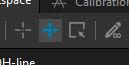
Processing modes
1
votes
Adding a feature that makes it possible to switch between modes by holding a designated key (Shift, Alt, Ctrl etc.). This would simplify and speedup the image processing process.
 vgymwwuwkkynlrbwogaf.jpg
Comments: 1
Oldest
•
Newest
•
Most likes
•
Fewest likes
-
04 Sep, '24
Cynthia Pang AdminHighlighted comment
We've updated the interaction modes, selection behavior, and shortcuts in the workspace. Users can now hold 'CTRL' to draw a selection rectangle and use 'I' and 'W' to toggle between interactive mode and windowing mode.
These improvements are available in the 1.0.0.3152 experimental release.